Template palette
Brief Overview of the Result
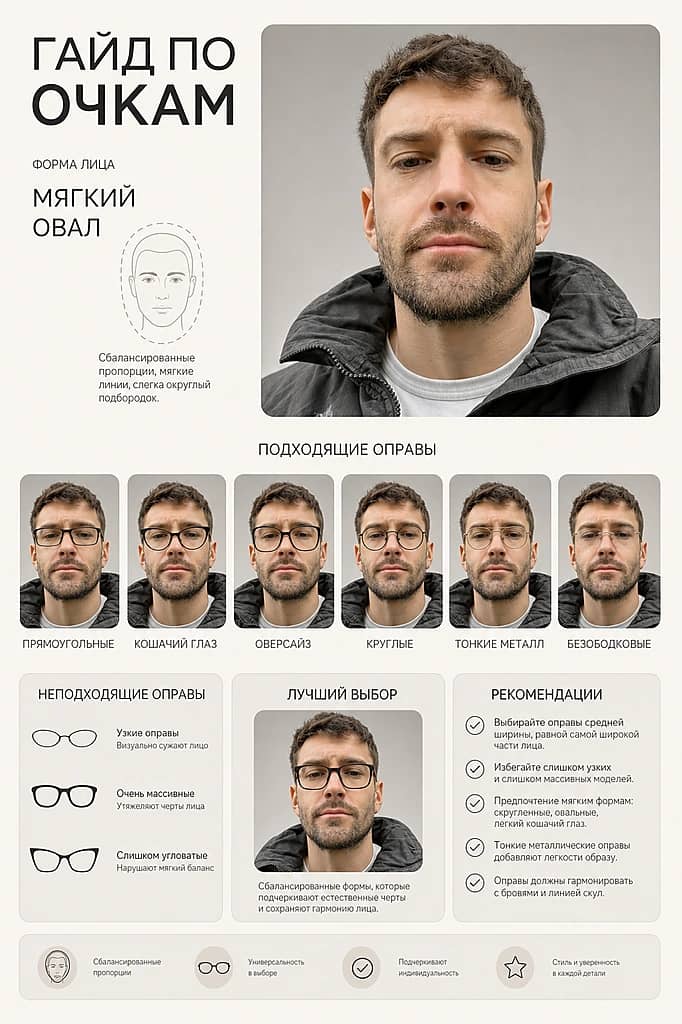
Clean, minimal card infographic featuring a six-frame row of glasses on the same portrait. The face retains its proportions and skin texture. Only the frames change; the pose, lighting, and expression remain the same.
Visuals and Mood
Strict premium style, soft studio lighting, neutral beige-gray-sandy palette. Shallow depth of field, neat shadows, matte background texture. Composition centers on the portrait with a uniform grid of rounded corner cards. Fonts are modern geometric grotesque, all text in English and error-free.
- Frames — 6 options side by side: rectangular, cat-eye, oversized, round, thin metal, rimless
- Angle — frontal, same angle and scale for all shots
- Info sections — “Fits”, “Doesn’t Fit”, “Best Choice”, “Face Shape”, “Recommendations”
- For whom — useful for opticians, stylists, editors, and glasses buyers; suitable with permission to use the portrait
At a glance
- GPT2You can switch to another model before you startauthor's pick
- Illustrationtemplate
- 26 ₽ per photo1 token = 1 ₽first photo is free
- ≈ 1 min 30 secAverage of recent generations with this modeltypical wait
- 1 face photofront-facing, good light
- May 14, 2026, 12:07 PM UTCupdated September 2
- Created 7 timeswith this template
 Author: @GG_VladislavUsed 7 times
Template palette
Brief Overview of the Result
Clean, minimal card infographic featuring a six-frame row of glasses on the same portrait. The face retains its proportions and skin texture. Only the frames change; the pose, lighting, and expression remain the same.
Visuals and Mood
Strict premium style, soft studio lighting, neutral beige-gray-sandy palette. Shallow depth of field, neat shadows, matte background texture. Composition centers on the portrait with a uniform grid of rounded corner cards. Fonts are modern geometric grotesque, all text in English and error-free.
- Frames — 6 options side by side: rectangular, cat-eye, oversized, round, thin metal, rimless
- Angle — frontal, same angle and scale for all shots
- Info sections — “Fits”, “Doesn’t Fit”, “Best Choice”, “Face Shape”, “Recommendations”
- For whom — useful for opticians, stylists, editors, and glasses buyers; suitable with permission to use the portrait
At a glance
- GPT2You can switch to another model before you startauthor's pick
- Illustrationtemplate
- 26 ₽ per photo1 token = 1 ₽first photo is free
- ≈ 1 min 30 secAverage of recent generations with this modeltypical wait
- 1 face photofront-facing, good light
- May 14, 2026, 12:07 PM UTCupdated September 2
- Created 7 timeswith this template